Shopify Cookie Consent: Laws & How to Build a Banner

Osman Husain
Shopify cookie consent is the practice of asking a store's visitors for permission before non-essential cookies and trackers run, then honoring each answer across the storefront. Shopify includes a built-in banner for this, and many stores replace it with a third-party consent app like Enzuzo.
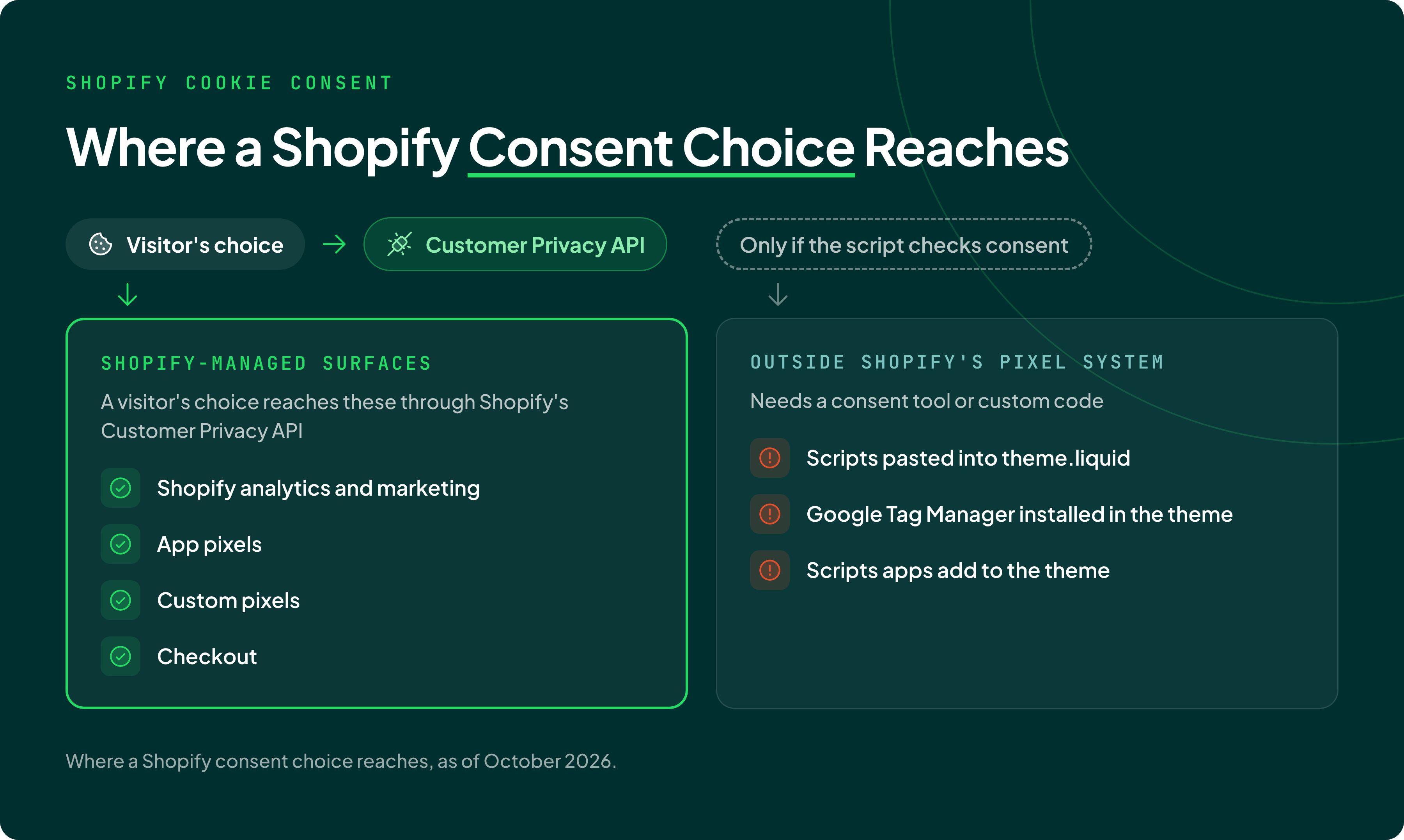
Visitor's consent choices reach Shopify-managed surfaces, such as pixels, audiences, and checkout flows.
What cookies does Shopify set?
Shopify sets 12 cookies on merchant storefronts, according to the Shopify cookie policy. It classifies 9 as necessary, 1 as reporting and analytics, 1 as marketing, and 1 as user preferences. The same policy says Shopify doesn't set advertising cookies on storefronts itself, though merchants may choose to.
| Cookie | Shopify's category | What it does | How long it lasts |
|---|---|---|---|
_shopify_essential |
Necessary | Session, checkout, and anti-tampering data | 1 year |
cart |
Necessary | Holds the cart's contents | 2 weeks |
cart_currency |
Necessary | Starts a new cart in the currency of the last checkout | 2 weeks |
localization |
Necessary | Localizes the cart to the right country | 1 year |
discount_code |
Necessary | Carries a discount code from a link to checkout | Session |
shopify_pay |
Necessary | Signs a returning buyer into Shop Pay at checkout | 1 year |
__Host-Http-shop_binding |
Necessary | Binds a Login with Shop sign-in to the browser session | 3 hours |
login_with_shop_finalize |
Necessary | Supports Login with Shop sign-in | 5 minutes |
_shopify_test |
Necessary | Checks whether the browser accepts cookies | 1 minute |
_shopify_analytics |
Reporting and analytics | Analytics data for the storefront and checkout | 1 year |
_shopify_marketing |
Marketing | Marketing data for the storefront and checkout | 1 year |
shopify_override_user_locale |
User preferences | Sets the user's language in the Shopify admin | 1 year |
Shopify cookies can also come from the apps that stores install and custom code added to themes. A review pixel, an email pop-up, or a chat widget can each add its own cookies.
Finding them takes a scan plus a manual browser check, which Enzuzo's guide to cookie consent management discusses in detail.
Shopify cookie changes
Shopify stopped setting the _landing_page, _orig_referrer, and _tracking_consent cookies on September 15, 2025, according to its developer changelog. For a visitor's consent status, Shopify now points developers to the Customer Privacy API instead of the old _tracking_consent cookie.
A second changelog post announced that Shopify would stop setting _shopify_y and _shopify_s from January 1, 2026. Its current cookie policy no longer lists either cookie and now lists three newer ones: _shopify_essential, _shopify_analytics, and _shopify_marketing.
Does a Shopify store need a cookie banner?
Yes, Shopify stores serving customers in the EU or the UK need a way to inform and collect user consent, through a cookie banner. Both the EU and the UK require consent before most non-essential cookies run. U.S. state privacy laws mostly work the other way: they require a way to opt out.
The guide to cookie banner requirements covers each law in more depth.
What EU and UK cookie rules mean for a Shopify store
In the EU, the ePrivacy Directive requires a site to get visitor consent before it stores or reads information on their device. Under the GDPR, that consent must be freely given, specific, informed, and unambiguous. The business must be able to show it was given, and withdrawing must be as easy as giving it.
The directive makes an exception for storage strictly necessary for a service the visitor asked for. Shopify classifies its cart and checkout cookies as necessary, and UK law treats keeping a record of a visitor's selections, such as a shopping cart, as strictly necessary.
Since February 5, 2026, UK law has also let a site use analytics cookies without consent, but only under conditions. Their sole purpose must be statistics to improve the site, and the data can't be shared except to help with that improvement. The visitor must also get clear information and a simple, free way to object.
A second UK exception covers cookies that adapt how a site looks or works to a visitor's preferences, under the same conditions.
Advertising cookies stay outside the UK's consent exceptions. The UK regulator's guidance on exceptions says advertising uses can never rely on them, and that tying a visitor ID to purchases shared with ad partners needs consent.
Advertising cookies placed without consent were also central to a EUR 150 million fine in France. On September 1, 2025, the CNIL, France's data protection authority, fined SHEIN's Irish subsidiary under France's cookie rules. It found that SHEIN placed advertising cookies before visitors touched the banner, and kept placing and reading cookies after they clicked Refuse all.
The same CNIL decision treated cookies that stop a discount pop-up from reappearing as advertising cookies that need consent first. Discount pop-up apps on Shopify stores can set cookies for the same purpose.
What U.S. privacy laws mean for a Shopify store
California's privacy law, the CCPA, gives consumers the right to tell a business to stop selling or sharing their personal information. Sharing, in the CCPA's sense, means passing personal information to others for ads targeted on a person's activity across other businesses' sites and apps. The law calls that cross-context behavioral advertising.
Shopify stores doing business in California must honor a browser signal such as Global Privacy Control. Under 11 CCR 7025, the signal counts as a valid opt-out request. At least nine states, including California, Colorado, and New Jersey, require businesses to honor a browser opt-out signal such as GPC.
Two California cases show how these rules play out on online stores:
- In 2022, Sephora paid $1.2 million to settle claims from California's Attorney General. The claims said third-party trackers on its online store were a sale of personal information, and that the site ignored GPC.
- In May 2025, California's privacy agency, the CPPA, fined Todd Snyder $345,178. For 40 days, the clothing retailer's cookie preferences banner disappeared when visitors opened it from the footer link, so their opt-outs went unprocessed.
California's wiretap law has no revenue threshold, so it reaches stores the CCPA doesn't. Section 631 of the California Invasion of Privacy Act (CIPA) bars reading a communication in transit without all parties' consent. Section 637.2 lets an injured person sue for $5,000 per violation without proving actual damages.
CIPA claims target cookies, pixels, tags, and beacons, and don't appear to discriminate by company size, according to an American Bar Association article cited in California's Senate analysis of SB 690. The guides to Meta Pixel lawsuits and a CIPA demand letter show examples in practice.
SB 690, signed September 30, 2026 and effective January 1, 2027, narrows one kind of CIPA claim. Section 638.51 covers tools that record where a communication comes from or goes to. SB 690 leaves website and app claims under that section to the Attorney General alone. Section 631 claims are unchanged.
Shopify itself faces a section 631 claim from a California shopper over cookies it allegedly placed on the shopper's device during a merchant's checkout. In Briskin v. Shopify, an 11-judge en banc panel of the Ninth Circuit held in April 2025 that Shopify can be sued in California. On July 30, 2026, the district court denied Shopify's motion to dismiss, and the case continues.
Both rulings decide whether the claims can go forward, not whether Shopify broke the law.
CIPA claims like these are why Enzuzo's California guidance recommends opt-in banners for California visitors, even though California's privacy law asks only for an opt-out.
How Shopify's built-in cookie banner works
The Shopify cookie banner, built into the Shopify admin at Settings > Customer privacy > Cookie banner, asks visitors for consent in the regions a store selects. It passes each choice to the Customer Privacy API automatically, and stores need a published privacy policy before they can use it.
Shopify's automated settings turn the banner on for visitors in the UK and the European Economic Area (EEA) when the store has active markets there. They're on by default for new stores, and older stores can switch them on. Everywhere else, including the U.S., the banner isn't active by default.
Merchants can turn off the automated settings and choose the banner's regions by country and U.S. state, and by Canadian province since May 2025.
The banner can show on the storefront, the cart, checkout, and customer account pages. The checkout banner, added in February 2025, is off by default. Visitors can reopen the banner to change their choices through a Cookie preferences link in the store's policies section.
Stores using Shopify's own banner get a consent audit log that covers the past 30 days. The GDPR requires a business to be able to show that consent was given, and a 30-day log can't show a choice made earlier than that.
Shopify's consent settings also cover U.S. opt-outs. In regions set up for data sale opt-out, usually U.S. states, Shopify offers a Data sharing opt-out page and adds a Your Privacy Choices icon. Shopify honors Global Privacy Control automatically in those regions.
What Shopify's cookie banner doesn't cover
Shopify's built-in cookie banner doesn't control scripts that a merchant or an app adds outside Shopify's pixel system, as of October 2026. Shopify's help center says those scripts may need a third-party banner or custom logic to honor consent. Its developer docs add that Shopify's standard storefront events fire whether or not a buyer has consented, and point developers to web pixels, which respect consent choices.
Web pixels are where Shopify's consent does reach. In regions that need consent, Shopify runs web pixels only after the visitor grants the permissions each pixel needs, then replays earlier events once consent arrives. An app pixel's privacy settings are set by the app's developer and can't be changed by the merchant.
Shopify is also changing how apps add code. They can't create or update script tags, the older method of injecting scripts into storefronts. Shopify will stop running script tags on storefronts from March 1, 2027, pointing developers to app embed blocks or web pixels for analytics and conversion scripts.
| Where the script runs | Does Shopify's consent reach it? | Note |
|---|---|---|
| Shopify's own analytics and marketing | Yes, through the Customer Privacy API | Pixels, audiences, and checkout are examples of Shopify-managed surfaces |
| App pixels | Yes, by the permissions the app's developer set | The merchant can't change them |
| Custom pixels in Settings > Customer events | Yes, by the pixel's Permission and Data sale settings | New pixels require marketing and analytics permission by default |
| Google Tag Manager loaded as a custom pixel | Yes: it runs inside Shopify's pixel sandbox and follows the pixel's permissions | Consent Mode needs a snippet added by hand |
| Scripts an app adds to the theme outside the pixel system | Not automatically | Shopify says they may need a third-party banner or custom logic |
| Google Tag Manager or other scripts pasted into theme.liquid | Not automatically | Needs a consent tool or custom code that checks consent |
| Checkout | Yes, as a Shopify-managed surface | Shopify's checkout banner is off by default |
Shopify's built-in banner and a consent app differ most on scripts outside Shopify's pixel system and on how long the consent record lasts:
| What a store needs | Shopify's built-in banner | A consent app connected to the Customer Privacy API |
|---|---|---|
| Consent for Shopify's pixels, audiences, and checkout | Follows each choice automatically | Follows each choice the app passes to the API |
| Consent for scripts in the theme, or added by apps outside pixels | Not covered without custom code | Covered where the app blocks scripts by category |
| Consent record | Audit log covering the past 30 days | The app's own log, for as long as the app keeps it |
| Regions | Set by country, U.S. state, and Canadian province | Set in the app, and matched to Shopify's regions |
| Google Consent Mode | Custom pixels need a snippet added by hand | Set through the app's Google Tag Manager or gtag setup, where the app supports it |
Holding scripts back until a visitor chooses is the enforcement step of consent management. The comparison of Shopify consent platforms covers how to choose an app for the tools Shopify's pixel system doesn't reach.
Shopify Customer Privacy API
The Shopify Customer Privacy API is the browser API that records each visitor's consent choices and tells Shopify's pixels, audiences, and checkout what they may do.
The API tracks four consent signals: analytics, marketing, preferences, and sale_of_data. The last one works as an opt-out: it's set only when a visitor asks, and false means the visitor opted out of data sale and sharing.
Scripts load the API with window.Shopify.loadFeatures and the feature name consent-tracking-api, after which it's available at window.Shopify.customerPrivacy.
A banner then records a choice with the setTrackingConsent method, for example setTrackingConsent({analytics: true, marketing: false, preferences: true}, callback). Shopify says to record consent only after a visitor action, never automatically on the visitor's behalf.
The API fires a visitorConsentCollected event when a visitor's consent changes, so other scripts can react to the new choice. In regions set up for data sale opt-out, setTrackingConsent can't override a visitor's Global Privacy Control signal.
Shopify's GDPR help page says Shopify Network Intelligence respects visitors' consent choices in two cases: a store using Shopify's banner, or a third-party tool properly integrated with the Customer Privacy API. Enzuzo's banner passes each visitor's analytics, marketing, and preferences choices to the Shopify Customer Privacy API.
How to set up cookie consent on Shopify
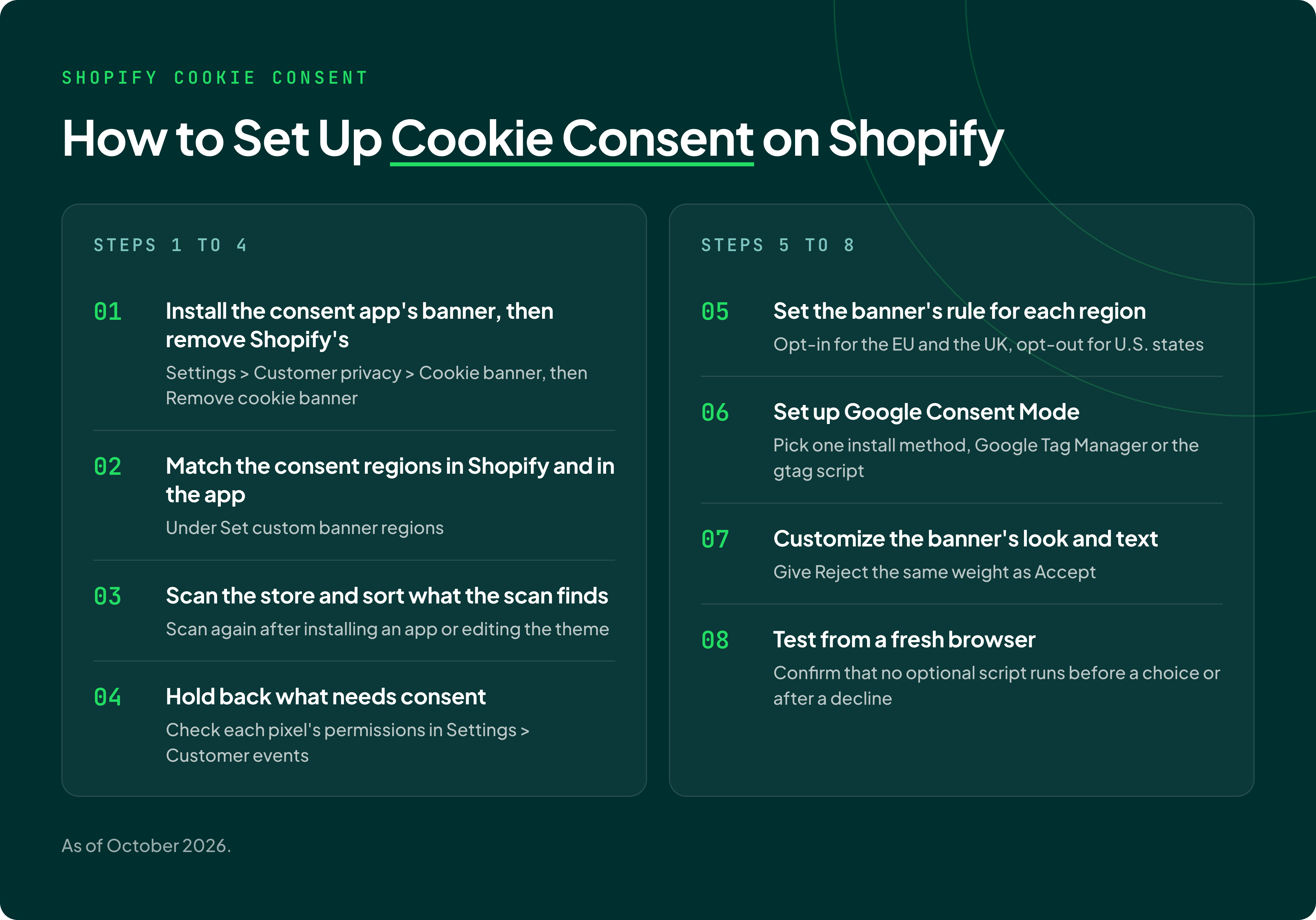
Setting up cookie consent on Shopify means replacing the built-in banner with a consent app and connecting it to Shopify's regions and pixel permissions:
- Install the consent app's banner, then remove Shopify's, so visitors see one Shopify cookie popup, not two. Go to Settings > Customer privacy > Cookie banner, open the ... menu, click Remove cookie banner, and confirm with Remove, as Shopify's settings guide describes. If the app's banner doesn't appear, check its app embed in the theme editor; Shopify notes app embeds can be off after an app is installed.
- Match the consent regions in Shopify and in the app. Shopify's setting is in the same ... menu, under Set custom banner regions. Its settings guide warns that if the two differ, non-essential data can be processed before a visitor consents.
- Scan the store and sort what the scan finds. A scanner lists the scripts and cookies on the store's domain. Each then goes into a category, such as necessary, analytics, marketing, or preferences. Scan again after installing an app or editing the theme, since either can add scripts.
- Hold back what needs consent. Tag theme scripts and embedded content with their category so the consent app releases them only after a matching choice. Then check each pixel's permissions in Settings > Customer events: custom pixels have Permission and Data sale settings, and app pixels follow their developer's settings.
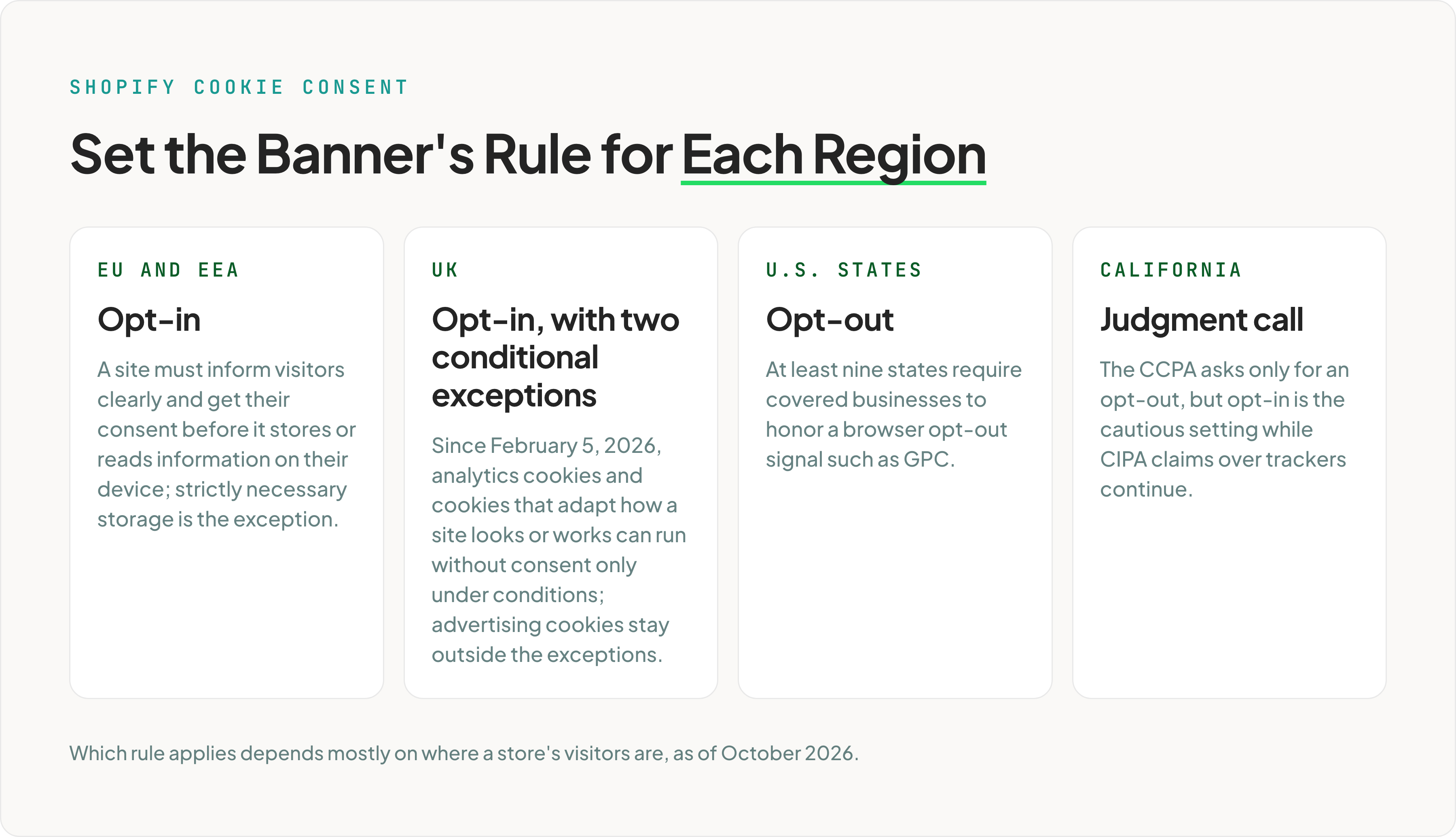
- Set the banner's rule for each region. Use opt-in where the visitor's law requires consent first, such as the EU and the UK, and opt-out for U.S. states. California is a judgment call: the CCPA asks only for an opt-out, but opt-in is the cautious setting while CIPA claims over trackers continue.
- Set up Google Consent Mode. Pick one install method, Google Tag Manager or the gtag script. Then fix any custom pixel that sets Google's consent types to granted regardless of the visitor's choice.
- Customize the banner's look and text. Set colors, position, and wording in the consent app, and give Reject the same weight as Accept.
- Test from a fresh browser. Load the store in a private window from a region where the banner shows. Confirm that no optional script runs before a choice or after a decline.
Installing Enzuzo on Shopify
Enzuzo's Shopify guide has merchants add the banner to the theme: a snippet named enzuzo-banner, rendered on the line after in theme.liquid. The banner can load through Google Tag Manager instead. Enzuzo recommends the theme install whether or not the Shopify app is installed.
Enzuzo's documentation notes that the banner can't block scripts that run before it loads. Shopify's own pixels don't depend on that blocking, because they follow the consent recorded in the Customer Privacy API, which Enzuzo's banner updates.
How to test a Shopify store's cookie consent
A Shopify store's cookie consent works when nothing optional loads before a visitor chooses, and the choice holds after a reload. Testing it takes a browser's developer tools and a few minutes.
Run these checks:
- Open the store in a private window, from a region where the banner should fire on the first visit.
- Open the Network tab, then reload without clicking the banner. Requests made before the developer tools opened don't show up, so the reload matters. Filter for ad and analytics hosts, such as facebook, tiktok, klaviyo, and google analytics. Two loads before a choice are expected: Google Tag Manager, when it loads the consent banner, and Google's tags in advanced Consent Mode, which send limited pings before consent.
- Decline, reload, and filter again. Optional scripts should stay quiet after a decline, including on the next page load.
- Check what Shopify recorded. In the browser console, run
window.Shopify.customerPrivacy.currentVisitorConsent(). It returns yes, no, or an empty value for each signal, and after a decline, analytics and marketing should read no. The API reference lists more checks, such asmarketingAllowed()andanalyticsProcessingAllowed(). - Reopen the preferences from the Cookie preferences link. Change one choice and save it.
- Compare the regions in Shopify and in the consent app. They should match.
- Repeat the checks on checkout. Shopify's checkout banner is off by default, so checkout shows no banner until it's turned on, even when the storefront does.
Cookie consent on Hydrogen and multi-market Shopify stores
Cookie consent on a Hydrogen store, built on Shopify's framework for headless storefronts, runs through Hydrogen Analytics. Shopify's Hydrogen consent guide still sets the banner's regions at Settings > Customer privacy > Cookie banner. The storefront code then turns the banner on with withPrivacyBanner: true.
Hydrogen Analytics manages the Shopify session server-side, so consent persists across pages and is honored at checkout.
Shopify's API docs say checkout must use the same root domain as the storefront for consent to carry over.
Stores that sell in several countries through Shopify Markets set the banner and the data sharing opt-out per region within one store.
How Enzuzo handles cookie consent on Shopify
Enzuzo's consent management platform runs a Shopify store's cookie banner, passes each visitor's choices to Shopify's Customer Privacy API, and sets Google Consent Mode through Google Tag Manager or the gtag script.
Enzuzo's Scan My Domain feature finds the scripts on a store's domain so they can be sorted into four categories: functional, analytics, marketing, and preferences. Merchants can run the scan again after adding an app or editing the theme.
Once scripts and embedded content are tagged with a category, Enzuzo holds them until the visitor consents to that category. The banner can be set to opt-in, opt-out, or hidden by region, and Enzuzo keeps a log of consent decisions.
The Shopify cookie banner page shows the banner's design options and how to start.
Google Consent Mode v2 on Shopify
Google Consent Mode v2 on Shopify passes each visitor's consent choice to Google's tags, which then adjust what they collect. Shopify's privacy settings guide says a store's privacy settings must be set up correctly for consent to reach Google. A store that sends data to Google through a custom web pixel must add a Consent Mode snippet manually.
Enzuzo, a Google Gold-certified consent management platform, sets Consent Mode v2 on Shopify through Google Tag Manager or the gtag script. Enzuzo's Consent Mode quickstart says to pick one method and follow it completely. Mixing them can load the banner, the consent defaults, and Google's tags in the wrong order.
The same choice reaches Shopify's own pixels and checkout through the Customer Privacy API, so one banner sets both.
In Google Tag Manager, the Enzuzo Cookie Manager tag fires on the Consent Initialization trigger. Google's tags then run in basic mode, blocked until consent, or advanced mode, which sends limited, non-identifying pings before consent. The Consent Mode setup guide walks through the install.
Frequently asked questions
How do I turn off the cookie banner on Shopify?
You can turn off Shopify's built-in cookie banner in Settings > Customer privacy > Cookie banner, from the ... menu, by selecting Remove cookie banner. Shopify says to switch on a replacement banner first and keep the same consent regions in both places. If the banner isn't showing at all, the visitor's region may be one where the store hasn't turned it on.
What is Shopify's cookie policy?
The Shopify cookie policy is Shopify's public list of the cookies it sets, including 12 on merchant storefronts as of its October 8, 2026 update. It names each cookie, its purpose, and how long it lasts, and says Shopify doesn't set advertising cookies on storefronts itself. A store's own privacy policy is separate, and Shopify requires a published one before its banner can be used.
Does Shopify's cookie banner block Meta Pixel or Klaviyo?
Shopify's cookie banner holds back the Meta Pixel or Klaviyo only when they run as Shopify web pixels. In regions that need consent, Shopify starts those pixels only after a visitor grants the permissions they need. The same tools pasted into theme code, or loaded through Google Tag Manager in the theme, run outside Shopify's pixel system. Those need a consent tool or custom code that checks consent.
Does Shopify honor Global Privacy Control?
Shopify honors Global Privacy Control automatically, but only in regions where a store has set up the data sharing opt-out, usually U.S. states. There, a browser's GPC signal opts the visitor out of data sale and sharing, and a consent app can't override it through Shopify's API. GPC doesn't replace opt-in consent for EU or UK visitors.
How do I add a cookie popup to Shopify?
A Shopify cookie popup can come from Shopify's built-in banner, switched on at Settings > Customer privacy > Cookie banner, or from a consent app. Shopify's banner needs a published privacy policy first. A consent app replaces it: install the app's banner, then remove Shopify's so visitors see one banner, not two.
Osman Husain
Osman is the content lead at Enzuzo. He has a background in data privacy management via a two-year role at ExpressVPN and extensive freelance work with cybersecurity and blockchain companies. Osman also holds an MBA from the Toronto Metropolitan University.
LinkedIn →More related blogs
Your next read