Google Consent Mode V2: What Changed From V1 and How to Implement It

Osman Husain

Google Consent Mode is a framework that tells Google tags how to behave based on a visitor's consent choices. If you use Google Ads, GA4, or any Google tag on your site, Consent Mode passes signals to Google that reflect whether users have accepted or declined tracking. Google tags then adjust their behavior to match.
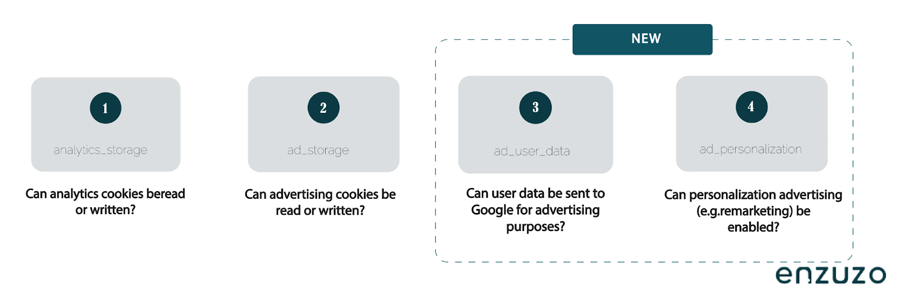
Consent Mode V2 is the current version. It keeps the two original signals from V1: ad_storage and analytics_storage, and adds two new ones: ad_user_data and ad_personalization. Those additions give Google more specific instructions about whether user data can be sent for advertising purposes such as for personalized ads and remarketing.
If you use Google Ads or GA4 for EEA, UK, or Switzerland traffic, V2 is what Google now expects. Here's everything you need to know about how it works, what changed from V1, and how to implement it correctly.
What Is Google Consent Mode?
Google Consent Mode is a framework that lets you send consent signals to Google. Those signals tell Google whether a user has granted or denied consent for certain types of storage and data use. Google tags then adjust their behavior to match those choices.
A common source of confusion is that Consent Mode is a cookie banner or consent management platform (CMP). It doesn’t collect consent by itself. You must use a separate CMP or a custom-built banner to handle that part of the process. The CMP then passes the user's choices to Google Consent Mode.
Why Google Consent Mode Exists
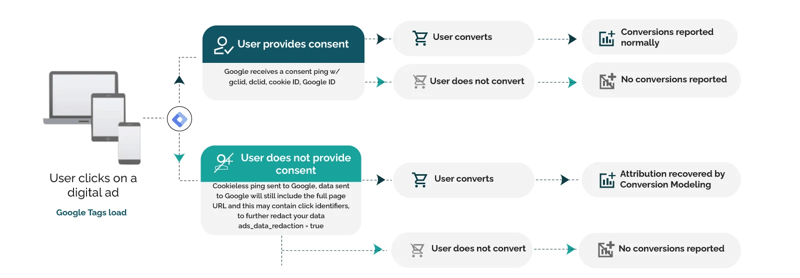
Google Consent Mode exists so websites and apps can keep using Google measurement and advertising tools in a way that reflects the user’s consent choices. Google says that if a user from the EEA visits your website or app and you use Google tags to measure behavior, you need to pass end-user consent choices to Google. Google updated Consent Mode to support more granular user consent for that traffic.
That’s the practical reason why Google Consent Mode matters. It isn’t just a banner setting buried in your CMP. It affects how Google Ads and GA4 collect and use data. In practice, this affects how much usable measurement data you retain and whether Google can support features tied to consented advertising and analytics activity.
Google Consent Mode V1 vs V2
In 2024, Google updated Consent Mode for EEA traffic and now requires advertisers using Google tags in scope to send consent signals that reflect end-user choices, typically via the latest Consent Mode implementation or TCF.
Consent Mode V2 keeps the original storage signals (ad_storage and analytics_storage) and adds ad_user_data and ad_personalization to provide more granular control over user data for advertising and personalization:
- ad_user_data: Controls whether user data can be sent to Google for advertising purposes.
- ad_personalization: Manages consent for personalized advertising and remarketing.
Google Consent Mode V1 and V2 at a glance
| Version | Consent signals | What it covers |
| Consent Mode V1 | ad_storage, analytics_storage | Whether Google can use ad and analytics storage |
| Consent Mode V2 | ad_storage, analytics_storage, ad_user_data, ad_personalization | Storage, ad-related user data sent to Google, and personalized advertising |
That’s the main change. V2 provides Google with more detailed instructions on how it can use ad-related data. It doesn’t replace your cookie banner. It doesn’t remove the need for consent collection. It just passes more specific consent signals to Google tags.
👉 Start building a cookie consent manager that's compliant with Google Consent Mode V2
What Do the Four Consent Signals Mean?
Here’s the plain-English version of each signal.
ad_storage
This controls storage related to advertising, such as ad cookies. If a user denies it, Google tags limit advertising-related storage.
analytics_storage
This controls storage related to analytics, such as cookies used to measure visits, sessions, and related behavior.
ad_user_data
This controls whether user data related to advertising can be sent to Google. Google says this signal is required for some measurement use cases, including enhanced conversions and tag-based conversion tracking.
ad_personalization
This controls whether data can be used for personalized advertising, such as remarketing or audience-based ad targeting.
Read our step-by-step guide to get compliant with Google Consent Mode
Basic vs Advanced Consent Mode
People often mix up V1 vs V2 with basic vs advanced Consent Mode. They aren’t the same thing. V1 and V2 refer to the available consent signals. Basic and advanced refer to the implementation of Consent Mode. Google documents both as implementation approaches for Consent Mode.
Basic Consent Mode
In basic Consent Mode, Google tags are blocked from loading until the user interacts with the consent banner. If the user doesn’t consent, no data is sent to Google at all before that interaction. Google says conversion modeling in Ads in this setup is based on a general model.
Basic mode is the stricter implementation. It’s often simpler to explain from a privacy perspective, though the setup can still get messy in Google Tag Manager (GTM) if scripts and triggers aren’t blocked correctly.
Advanced Consent Mode
In advanced Consent Mode, Google tags load before the user interacts with the banner, using denied consent defaults until the user makes a choice. Google says Consent Mode uses pings to communicate consent status and key events, which can support conversion and behavioral modeling in Google Ads and GA4.
This is the setup most people mean when they talk about cookieless pings. The tags still adapt to the consent state. They don’t operate as though consent has been granted.
How Google Consent Mode works with Google Ads
Google Consent Mode directly affects how Google Ads measures conversions, builds audiences, and reports on campaign performance. If you run Google Ads for EEA traffic and don't have Consent Mode configured correctly, you're working with incomplete measurement data, and in some cases, no data at all for non-consenting users.
Here's what actually changes when Consent Mode is active.
What happens to conversion tracking when users don't consent
When a user declines consent, Google tags can no longer read or write advertising cookies. That means standard conversion tracking; the kind that fires a tag on a thank-you page and maps it back to a click, doesn't work for that user.
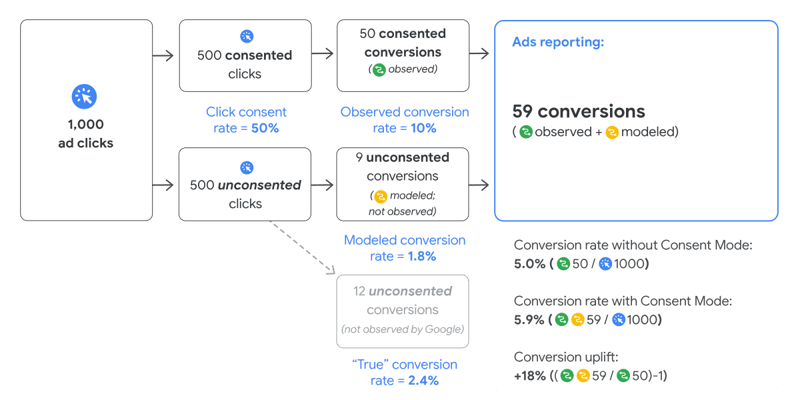
In advanced Consent Mode, Google tags send cookieless pings instead. These pings don't contain personally identifiable information and don't set cookies, but they do communicate that a conversion-relevant event occurred. Google uses those pings, combined with consented signals from other users, to model estimated conversions for the non-consenting portion of your traffic.
In basic Consent Mode, tags don't load at all before consent. There are no cookieless pings. Conversion modeling in this setup relies on a general model rather than advertiser-specific signals, which typically means lower modeling accuracy.
The 700-click threshold for conversion modeling
Google applies a minimum traffic threshold before advertiser-specific conversion modeling activates. The requirement is 700 ad clicks over a 7-day period for a domain and country grouping.
If your account doesn't meet that threshold, Google Ads will show "Consent mode is implemented" in the diagnostics tab, but modeling won't be active. For lower-traffic accounts or niche geographic markets, this threshold may take time to reach — or may not be reachable at all. In those cases, Consent Mode is still worth implementing for compliance reasons, but the modeling benefit won't apply.
Source: https://support.google.com/google-ads/answer/10548233?hl=en
What the Google Ads diagnostics tab tells you
Google Ads shows one of three consent mode statuses under Goals > Conversions > Diagnostics:
Consent mode is implemented. Your setup is correct but you haven't yet met the threshold for conversion modeling. No uplift data is available yet.
Consent mode is implemented and modeling is active. Modeling is running. For the first four weeks after modeling starts, Google shows uplift data per domain and country. After that window closes, the status remains but the uplift table disappears.
No consent mode status shown. Consent mode isn't detected for that conversion action. This usually means the signals aren't firing correctly, or the default consent state isn't being set before the tag loads.
How Consent Mode V2 signals affect Google Ads specifically
The two signals added in V2 — ad_user_data and ad_personalization — have direct implications for Google Ads beyond basic conversion tracking.
ad_user_data controls whether user data can be sent to Google for advertising purposes. This signal is required for enhanced conversions and tag-based conversion tracking to function as intended. If this signal is denied, Google can't receive the hashed first-party data that enhanced conversions depends on.
ad_personalization controls whether data can be used for remarketing and audience-based targeting. If a user denies ad_personalization, they won't be added to your remarketing lists or custom audiences in Google Ads. For businesses that rely heavily on audience building and retargeting for EEA traffic, this is the signal that has the most direct campaign impact.
This is why V2 isn't just a compliance checkbox. The new signals affect which measurement features work and which audience-building workflows are available for your covered traffic.
Advantages and disadvantages of Google Consent Mode
Google Consent Mode can help reduce measurement gaps by allowing Google to model some conversions and user behavior when visitors do not grant consent. In advanced implementations, Google says consent-aware tags can send cookieless pings, which support advertiser-specific modeling in Google Ads and modeling in Google Analytics.
The trade-off is that it does not restore full visibility. Modeled data is still modeled data, and some reporting gaps will remain. Google also applies data thresholds before modeling becomes useful in practice. For example, Google Ads conversion modeling requires 700 ad clicks over 7 days for a domain by country grouping.
There is another concern worth noting. Even when Google says denied-consent users are not tracked with normal cookies, some organizations and users may still object to cookieless pings and modeled measurement on principle. That is less a technical failure than a trust and governance issue. It means teams should think about user expectations and transparency, not just implementation.
Is Google Consent Mode mandatory?
The answer depends on your setup. If a user from the EEA is using your website or app and you measure user behavior with Google tags, Google says you need to pass end-user consent choices to Google. That means Consent Mode or the Interactive Advertising Bureau (IAB) Transparency and Consent Framework (TCF) matters for advertisers and site owners using Google tags for EEA traffic.
For publishers, Google has a more specific requirement. Partners using Google AdSense, Ad Manager, or AdMob must use a Google-certified CMP integrated with the IAB TCF when serving personalized ads to users in these regions:
- EEA and UK: from 16 January 2024
- Switzerland: from 31 July 2024
Google has also stated that publishers serving ads in covered regions must work with certified CMPs. As Google explains, “Publishers will need to ensure they are working with a certified CMP when serving personalized ads to users in the EEA, the UK, or Switzerland.”
That’s why saying “Consent Mode is mandatory” across the board is too blunt to be useful. The precise version of this is:
- Advertisers and sites using Google tags for EEA traffic need to send consent signals to Google.
- Publishers serving personalized ads through Google publisher products need a Google-certified CMP integrated with the IAB TCF in the covered regions.
Who should care about Consent Mode V2?
Consent Mode V2 matters most if you fall into one of these groups:
Advertisers using Google Ads
You need consent signals that reflect user choices for covered traffic, and V2 adds the ad-related signals Google now expects for measurement and personalization use cases.
Teams using GA4
For GA4 behavioral modeling, Google lists several eligibility requirements, including Consent Mode across all pages, advanced Consent Mode implementation for web, and at least 1,000 events per day with analytics_storage='denied' for at least 7 days.
Publishers
If you use AdSense, Ad Manager, or AdMob and serve personalized ads in the EEA, UK, or Switzerland, the CMP requirement is the big one to watch.
Agencies and developers
If you manage GTM, CMP implementation, analytics, or ad tracking for clients, this is now part of the stack. A weak setup can break measurement, ad reporting, or compliance workflows.
Enzuzo is a Google-Certified CMP in the Gold category, enabling compliance with consent mode v2. Book a call to see how it can help your setup
How Google Consent Mode works
At a high level, Consent Mode follows a simple flow:
- Your site shows a consent banner or CMP.
- The CMP or banner records the user’s choices.
- Those choices are passed to Google through Consent Mode.
- Google tags adjust behavior based on the consent state.
Google’s setup guide says you need to do two things:
- Set the default consent state before the user grants consent.
- Update the consent state after the user interacts with your consent settings.
That’s the heart of the implementation. Miss either step, and your implementation may not behave as intended.
How to set up Google Consent Mode
The exact steps depend on whether you use your own banner, GTM, or a CMP with built-in Consent Mode support. The process still comes down to the same core tasks.
1. Set default consent before user interaction
Google says the default consent state should be set before the user grants consent. This default controls how tags behave when the page first loads.
2. Update consent after the user makes a choice
Once the user accepts, rejects, or customizes consent, your site needs to update those signals on the page where the interaction happens. Google notes that these updates should be tracked before any page transition.
3. Pass all relevant V2 signals
If you’re implementing V2, make sure you’re not just sending ad_storage and analytics_storage. You should review whether ad_user_data and ad_personalization need to be configured, too.
4. Check region-specific defaults
Google’s implementation guide supports region-specific consent defaults. This matters if your consent model differs by market. For example, a site might apply denied defaults in the EEA and different defaults elsewhere.
5. Test the setup before pushing it live
Don’t assume the CMP toggle means the implementation is correct. You need to verify the signals on-page and make sure tags behave the way you expect.
How to verify Google consent mode
There are two practical ways to check your setup: Tag Assistant and Google Ads diagnostics.
Verify with tag assistant
Google recommends Tag Assistant to verify whether Consent Mode is implemented correctly. A simple check looks like this:
- Open Tag Assistant and enter your website URL.
- Open your site in a new tab and interact with your cookie banner.
- In Tag Assistant, select the earliest Consent event in the summary.
- Check that the default consent state was set correctly for the relevant parameters, including ad_storage, analytics_storage, ad_user_data, and ad_personalization.
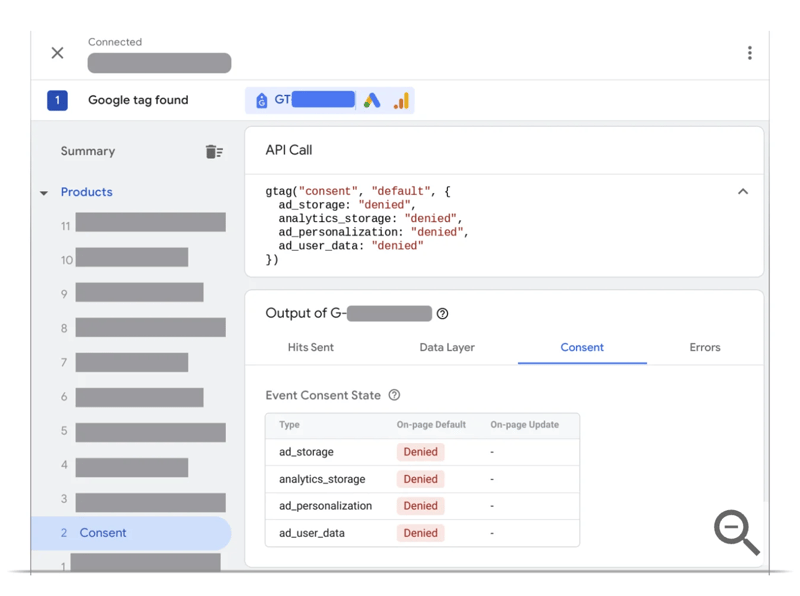
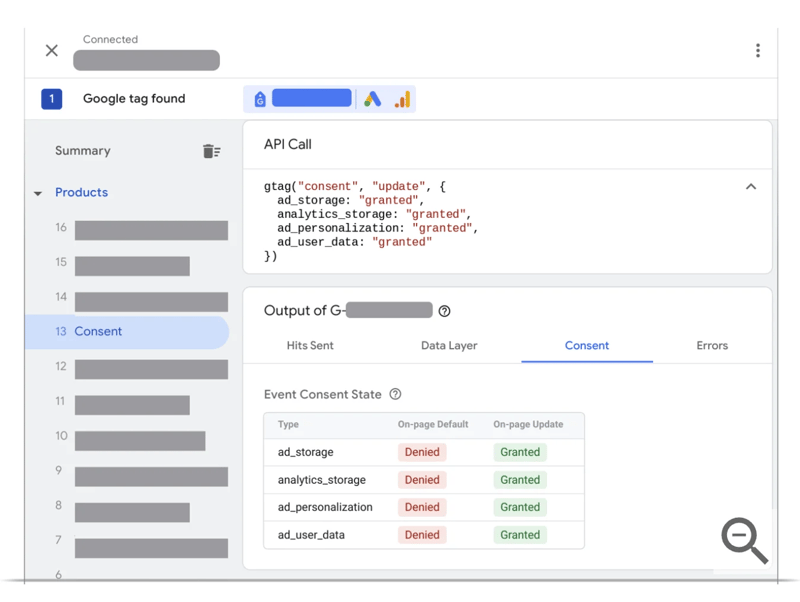
When you review the setup, check that:
- The default consent state is set before user interaction.
- The updated consent state reflects the user’s banner choice.
- Tags fire or stay blocked in line with the consent state.
Verify with Google Ads diagnostics
Google Ads diagnostics can show whether Consent Mode is implemented and whether modeling is active. Google states that the click threshold for conversion modeling is 700 ad clicks over 7 days for a domain-by-country grouping.
That threshold matters. You can have a correct implementation and still not see modeling activate if your traffic volume doesn’t meet the threshold.
How consent mode affects Google Ads and GA4
When Consent Mode is active, Google tags adapt to the user’s consent state. In advanced implementations, Google says consent status and key events can still be communicated through pings, which supports modeling in Google Ads and GA4.
In practice, this means:
- Users who grant consent can usually be measured in the normal way.
- Users who deny consent may be measured in a more limited way, depending on your implementation.
- Google may use modeling to estimate some missing conversions or behavior in aggregate reports.
It’s also worth noting that cookieless pings do not always show up in reporting in a way that is obvious to users. In some cases, those pings may not appear directly in Google Analytics or Google Ads data, even when they are still contributing to modeled measurement behind the scenes.
That doesn’t mean Consent Mode restores every lost data point. It doesn’t turn denied consent into full tracking. It’s a measurement adjustment layer, not a magic trick.
These cookieless pings are crucial for generating more accurate, advertiser-specific models in both Google Ads (conversion modeling) and GA4 (behavioral modeling). Without them, modeling accuracy can be significantly impacted.
Common Google consent mode mistakes
Many Consent Mode setups look fine on the surface but still fail in practice. These are the issues that tend to break things.
Treating consent mode as the CMP
Consent Mode isn’t the banner. It depends on the banner or CMP to collect and pass consent choices.
Sending only the old V1 signals
Many older setups still pass ad_storage and analytics_storage, but don’t account for ad_user_data and ad_personalization. That leaves the V2 update half-finished.
Confusing V2 with Advanced Mode
V2 is about the consent signals. Advanced mode is about how tags load and behave before the user interacts with the banner.
Assuming Google-Certified CMP rules apply to every site
The certified CMP requirement is very specific for publishers using Google Publisher products and serving personalized ads in covered regions. It’s not a blanket rule for every site using Google Ads or GA4.
Never checking the implementation in Tag Assistant
CMP settings can look correct in the dashboard and still fail on-page. Verification isn’t optional if you care about clean reporting.
Use Enzuzo for consent mode implementation
If you want to implement Google Consent Mode without stitching together a custom banner, manual tag logic, and ongoing compliance checks, using Enzuzo can make the process much easier.
Google Consent Mode requires more than just showing a banner. You need to collect valid consent, pass the right signals to Google, account for region-specific requirements, and verify that your setup is working as intended. That can become complicated quickly, especially if you are managing Google Ads, GA4, GTM, and EEA traffic at the same time.
Enzuzo helps simplify that process. As a Google-certified CMP (in the gold category), it can help you manage consent collection and support Consent Mode V2 in a more structured way. That gives teams a more practical path to handling consent signals, reducing manual setup, and keeping implementation easier to manage over time.
Book a call with a consent mode expert to audit your current workflow
Final Take
Google Consent Mode V1 and V2 aren’t two separate tools. V2 is an update to the original framework. The practical difference is simple:
- V1 covered ad and analytics storage.
- V2 adds ad user data and ad personalization signals.
If you use Google Ads, GA4, or publisher products in markets affected by Google’s consent requirements, this isn’t a side issue. It affects your measurement, your ad workflows, and how Google interprets user choices. The cleanest path is to use a CMP or consent setup that collects valid consent, sends the right signals, and provides a logical way to verify the implementation.
FAQ about Google Consent Mode V1 and V2
What’s the difference between Google Consent Mode V1 and V2?
V1 used two consent signals: ad_storage and analytics_storage. V2 keeps those and adds ad_user_data and ad_personalization. In plain English, V2 gives Google more detail about whether ad-related user data can be sent to Google and whether data can be used for personalized ads.
Is Google Consent Mode the same as a cookie banner?
No. Google says Consent Mode doesn’t provide a consent banner or widget. It works with your banner or CMP, which collects the user’s consent choice and passes that choice to Google tags.
Is Google Consent Mode mandatory?
It depends on your setup. Google says that if a user from the EEA uses your website or app and you use Google tags to measure behavior, you need to pass end-user consent choices to Google. Publishers using AdSense, Ad Manager, or AdMob for personalized ads in the EEA, UK, or Switzerland face stricter CMP requirements.
How to add Google consent mode in v2?
You add Google Consent Mode V2 by setting default consent signals before user interaction and updating those signals after the user accepts, rejects, or customizes consent. A complete setup should account for ad_storage, analytics_storage, ad_user_data, and ad_personalization, then be tested in Tag Assistant to confirm that the consent state updates correctly.
What’s the difference between basic and advanced Consent Mode?
Basic Consent Mode blocks Google tags until the user interacts with the banner, so no data is sent before that interaction. Advanced Consent Mode loads tags with default consent settings and uses pings to communicate consent status and key events, which can support modeling in Google Ads and GA4.
How do I know if Google Consent Mode is working?
The most practical checks are Tag Assistant and Google Ads diagnostics. Tag Assistant lets you inspect the default and updated consent events on-page. Google Ads diagnostics can show whether Consent Mode is implemented and whether modeling is active. Google says the click threshold for conversion modeling is 700 ad clicks over 7 days for a domain-by-country grouping.
How does Google Consent Mode V2 affect Google Ads conversion tracking?
Google Consent Mode V2 adds two signals — ad_user_data and ad_personalization — that directly affect how Google Ads measures and targets EEA traffic. If a user denies ad_user_data, Google cannot receive the hashed first-party data that enhanced conversions and tag-based conversion tracking depends on. If a user denies ad_personalization, they won't be added to your remarketing lists or custom audience segments.
For users who deny consent entirely, advanced Consent Mode allows Google tags to send cookieless pings. Google uses those pings alongside consented signals from other users to model estimated conversions in aggregate. That modeling only activates once your account reaches 700 ad clicks over 7 days for a given domain and country grouping.
Osman Husain
Osman is the content lead at Enzuzo. He has a background in data privacy management via a two-year role at ExpressVPN and extensive freelance work with cybersecurity and blockchain companies. Osman also holds an MBA from the Toronto Metropolitan University.
LinkedIn →More related blogs
Your next read