Chantelle Golombick

Termly is a data privacy compliance platform that helps websites create legal policies, scan for cookies, add cookie consent banners, record visitor choices, and manage basic privacy tasks from one dashboard.
This review examines Termly's consent management tools, cookie banner UX, cookie scanner, policy generators, pricing, pros and cons, and suitability for growing consent programs for multi-domain SaaS, ecommerce, and agency operators.
How I reviewed Termly
The core aspects I examined in this review were how Termly fares in consent management setup, cookie banner UX, policy generation, pricing, and technical support.
I checked scan frequency, plan limits, and buyer fit, and cross-referenced claims against Termly's own documentation and user reviews on sites like Capterra. Feature availability and feature fit were two separate qualifiers, since a tool can offer a cookie banner, consent logs, and regional settings, yet still be a poor fit for a business that needs deeper control across several websites and markets.
Who is Termly best for, and who should consider an alternative?
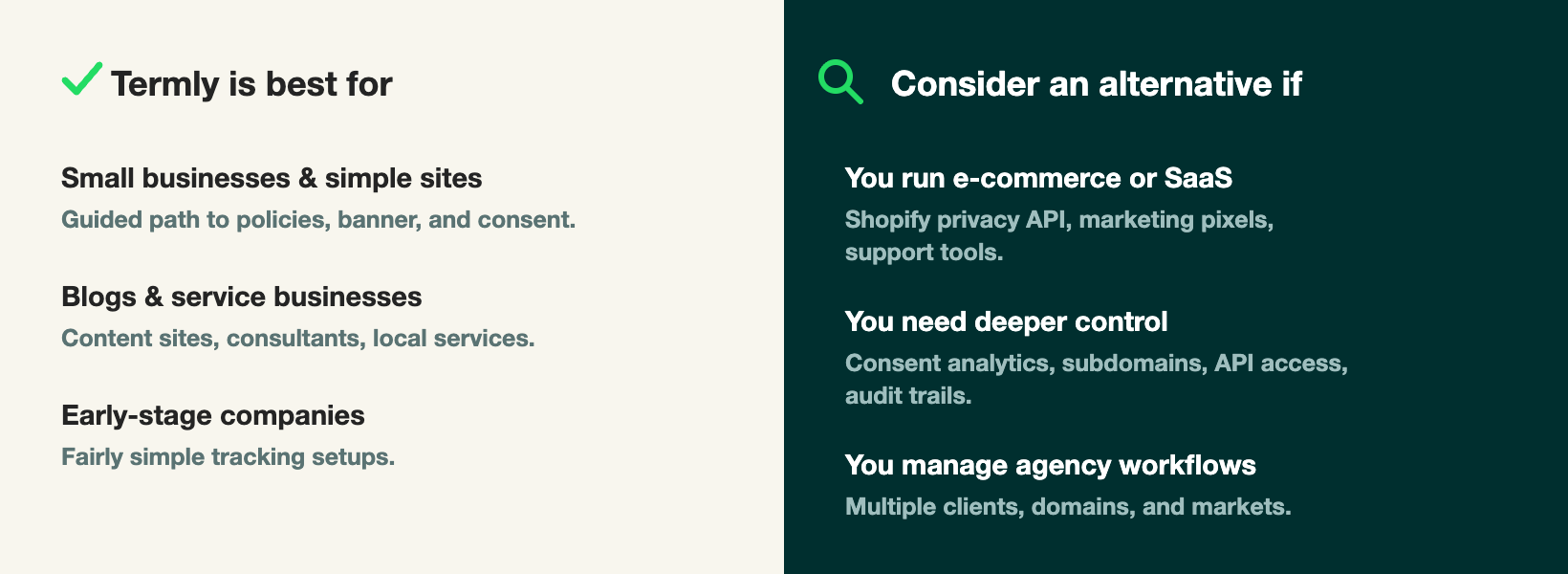
The core discovery: Termly is best for small businesses and simple websites. These teams often need a privacy policy, cookie policy, terms and conditions, and a simple cookie banner without a long setup process. Termly provides them with a guided path through those tasks, reducing legal and technical complexity.
Termly may also work for blogs, service businesses, and early-stage companies. Examples of these include content sites, local service companies, or early stage startups that need simple privacy banners and legal policies. Termly covers those requirements effortlessly.
The complexity starts when consent management becomes a pressing business priority; often when companies expand to different markets or have complex tracking and marketing attribution systems setup. These businesses often collect data through checkouts, customer accounts, marketing pixels, analytics platforms, support tools, and email systems. A Termly alternative is a better fit when the business needs more control via API access, analytics, multi-domain consent, audit trails, or agency workflows.
Termly consent management review
Termly's consent management tools cover the main steps most websites need: scan the site, identify cookies, publish a banner, collect choices, store consent logs, and adjust consent settings by region.
Cookie consent banner
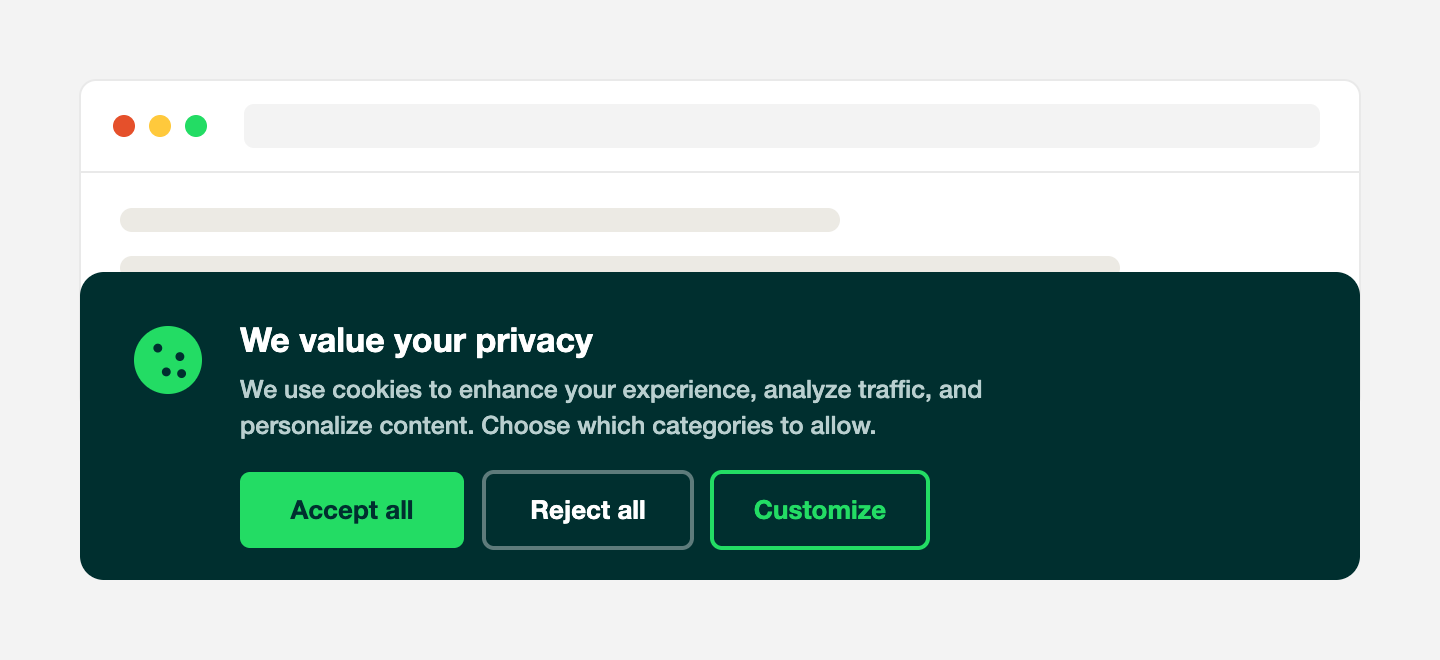
Termly's cookie consent banner gives visitors a way to accept, reject, or manage cookie choices. This is the visible part of the consent process, so it needs to explain the choice and connect that choice to the scripts and trackers running on the site.
For a small site, setup is fairly direct. Users can create a banner after scanning the site, then place it on the website with a code snippet or platform instructions. Before going live, check that:
- Cookie categories use plain language.
- Accept, reject, and preference options are easy to find.
- The banner works on desktop and mobile screens.
- Optional scripts don't run before consent in regions that need prior consent.
Termly's Auto Blocker adds another layer worth testing directly. It blocks any third-party script it can't automatically classify, holding it under an "Unclassified" category until a visitor consents. That's useful for catching cookies the business didn't know were running, but according to Termly's own Auto Blocker documentation, it can also block scripts that are core to the site, like live chat, on-site search, or review widgets, if it doesn't recognize them. Businesses should manually review and re-categorize scripts after setup rather than assume Auto Blocker got every classification right on the first pass.
Preference center
A preference center gives visitors a place to view and change cookie choices. Although plan-gated, Termly includes a preference center that can be adjusted with colors, fonts, position, display style, and language settings.
The best preference centers use plain category names, brief explanations, and simple controls. Labels like analytics, advertising, and strictly necessary should be paired with short descriptions. Visitors shouldn't need privacy expertise to understand each category.
Consent logs and records
Termly includes consent logs that help businesses record visitor choices. A consent log should help the business answer: what choice did the visitor make, when did the visitor make that choice, which banner version was active, and can the team export records when needed?
Termly gives users access to consent logs on Pro+ and Agency plans.
Regional consent settings
Termly supports regional consent rules on higher-tier plans. This matters since privacy rules differ across markets. Some regions focus on opt-in consent for certain cookies and trackers. Others focus on opt-out rights, sale or sharing choices, and privacy policies.
For a business with visitors from several regions, the banner may need to adjust its wording, button choices, and default behavior based on visitors' locations. Before publishing, check which regions are active, which choices appear in each region, which scripts run before and after consent, and which plan includes regional consent rules.
Google Consent Mode
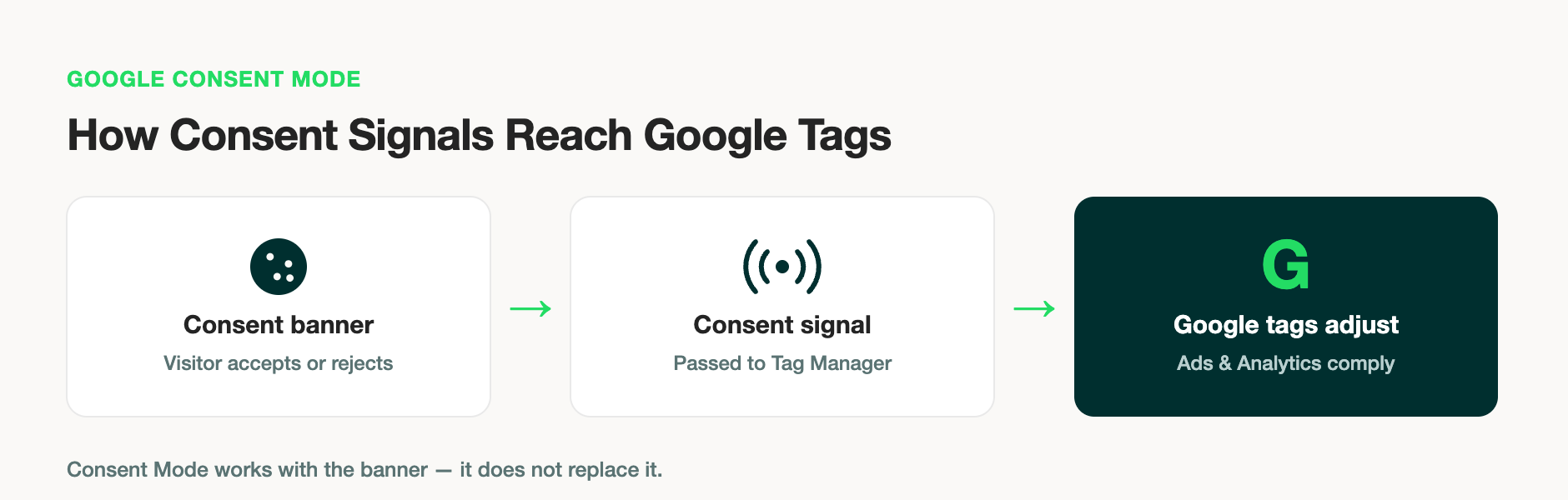
Google Consent Mode sends consent signals to Google tags so tools like Google Ads and Google Analytics can adjust their behavior based on a visitor's consent choice. It doesn't replace the cookie banner. It works with the banner.
Termly lists Google Consent Mode v2 among its CMP features and includes advanced Google Consent Mode v2 in the Pro+ plan. During setup, confirm that the banner collects the right consent choices, Consent Mode settings are switched on, and Google Tag Manager receives the correct signals during testing.
IAB TCF support
IAB TCF stands for the Transparency and Consent Framework. It's a standard used in digital advertising to pass consent and objection choices between publishers, consent management platforms, and advertising vendors.
Termly lists support for IAB TCF 2.3 on Pro+ and Agency plans. This feature matters most for websites that work with ad-tech vendors, programmatic advertising, or publisher monetization tools. Before relying on it, confirm plan access, vendor list fit, and the site's ad stack needs.
Evaluating Termly for your team? Book a strategy call to audit your consent stack and see if Enzuzo is a better fit for your needs.
Termly cookie banner UX
Termly's cookie banner UX is built around guided setup. That suits users who want to move from scan to banner to published policy without building a consent system from scratch. Good banner UX has two audiences: the visitor and the website owner. Visitors need clear choices. Website owners need setup controls that don't require constant developer support.
Setup flow
Termly's setup starts with a website scan. The platform identifies and categorizes cookies, then guides the user through consent banner settings and website installation. Test the setup in this order:
- Scan the website.
- Review the cookie list and categories.
- Configure the banner style and region settings.
- Install the banner script.
- Test scripts before and after consent.
- Publish the cookie policy.
That order matters because some teams publish a banner before checking which cookies it found or how scripts behave. That can create gaps between what the banner says and what the site actually does.
Banner design and customization
Termly provides banner controls for colors, fonts, display style, position, language, and preference center styling. Higher-tier plans include custom banner styles and multi-language support.
Design control affects trust and clarity. A banner should look like part of the website, but it shouldn't hide choices or make one choice look safer than another. Subtle reject buttons, vague labels, or confusing category names can weaken the visitor experience.
Mobile experience
Cookie banners often fail on mobile through crowding. The banner may take up too much screen space, cover key page actions, or make the preference center difficult to use.
Termly's banner should be reviewed on common mobile screen sizes before launch. Check banner placement, button size, text length, preference center layout, reject behavior, and scrolling inside the preference center.
Termly cookie scanner review
Termly's cookie scanner scans a website to identify and categorize cookies and trackers. This helps website owners understand which cookies are present, create a cookie policy, and connect cookie categories to consent choices.
The scanner is useful for websites without a clean inventory of scripts, pixels, plugins, and embedded tools. A scanner can surface cookies the business forgot about or didn't know were active.
Still, cookie scanning needs human review. Teams should check that scan results match the tools installed on the site, cookie categories are correct, no cookies are missing, scans run often enough, and new cookies are reflected in the cookie policy.
Termly's plan limits matter here. The Free plan includes quarterly scans. Starter includes monthly scans. Pro+ includes weekly scans.
Termly policy generators
Termly's policy generators are a main reason small businesses choose the platform. The tools guide users through a series of questions and then create website policies based on the answers.
Termly's policy tools cover common documents, including privacy policies, cookie policies, terms and conditions, disclaimers, return policies, shipping policies, end-user license agreements, and acceptable use policies.
The value sits in speed and structure. A small business can move from no policy to a publishable draft without starting from a blank page. Termly's hosted policies can be embedded into a website, which helps with updates.
Termly pricing
Termly's pricing is plan-based and charged per domain for the self-serve options. The current public pricing includes Free, Starter, Pro+, and Agency options.
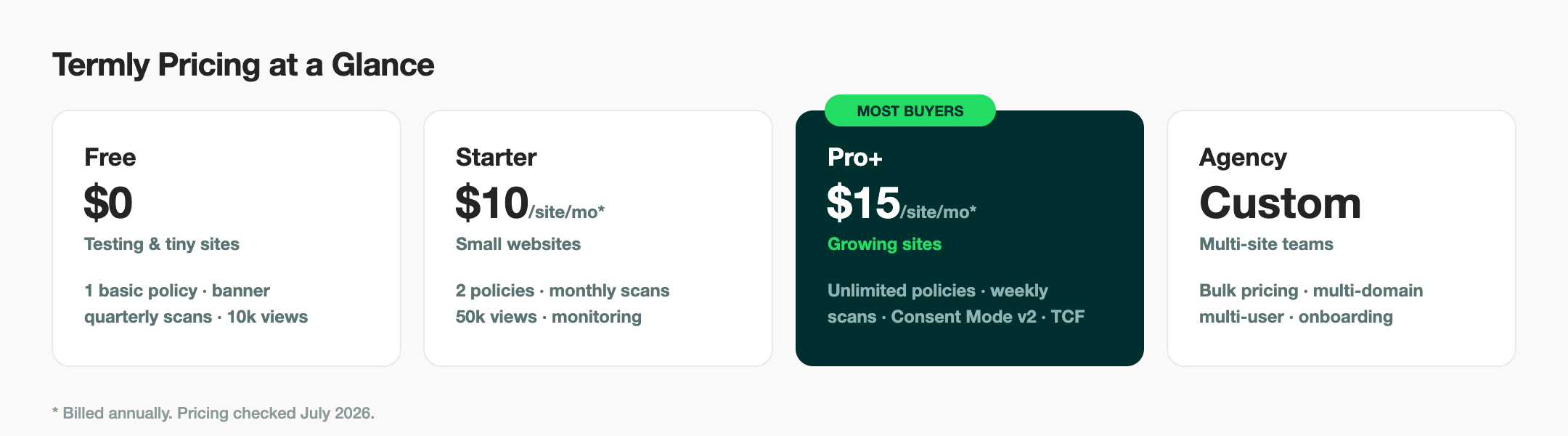
| Plan | Price* | Best fit | Key limits and features |
| Free | $0 | Testing and very small websites | 1 basic legal policy, 10,000 monthly banner views, cookie policy and banner, script auto blocker, embeddable policies, and quarterly cookie scans. |
| Starter | $10 per website/month billed annually, or $14 billed monthly | Small websites | 2 legal policies, 10 policy edits, 50,000 monthly banner views, monthly cookie scans, regular policy updates, and regulation monitoring. |
| Pro+ | $15 per website/month billed annually, or $20 billed monthly | Growing sites | Unlimited legal policies, unlimited policy edits, unlimited banner views, weekly cookie scans, auto-updated policies, Google Consent Mode v2, IAB TCF 2.3, custom banner styles, multi-language support, regional consent rules, and logo removal. |
| Agency | Custom | Agencies and multi-site teams | Bulk pricing, multi-domain management, multi-user permissions, onboarding, compliance support, and bulk import. |
*Pricing and features checked in July 2026
The Free plan is useful for trying the product and covering basic website needs. Starter gives small websites more room, but it still limits policy access, edits, and banner views. Pro+ is the plan most buyers will need if they want advanced consent features.
Termly customer support
Termly offers support through live chat, email, and a self-serve help center with articles covering common setup questions, including detailed guides on how Auto Blocker categorizes and blocks scripts.
Reviews on Capterra show a mixed picture. Some users describe Termly's team as responsive and helpful with setup questions. Others report slower response times when they run into technical issues or need help customizing a policy. Since experiences vary, businesses with time-sensitive compliance questions should test response times directly, through the help center or a live chat exchange, before relying on Termly's support for anything urgent.
Termly pros and cons
Termly's strengths and limits depend on the buyer's use case.
| Pros | Cons |
| Guided setup that suits non-technical users | Some advanced CMP features sit behind higher-tier plans |
| Legal policy generators for common website documents | Generated policies still need business-specific review |
| Cookie scanner and cookie categorization | Scan results need manual checking before publication |
| Cookie banner and preference center | Auto Blocker can over-block scripts it doesn't recognize (chat, search, reviews) until manually re-categorized |
| Google Consent Mode v2 and IAB TCF 2.3 support on Pro+ | Smaller plans may not include the features that marketing or ad teams need |
The best Termly alternative depends on the problem a business is trying to solve. Some buyers need legal policies. Some need cookie consent. Some need deeper privacy workflows across e-commerce, SaaS, advertising, or agency clients.
Common options include Enzuzo for e-commerce, SaaS, agencies, and growing privacy programs; OneTrust for enterprise privacy teams; Cookiebot for cookie scanning and consent banners; CookieYes for smaller sites; iubenda for legal policies and cookie consent; and TermsFeed for legal documents.
Compare these tools by workflow, not feature count alone. The better choice is the one that fits the site's data collection, traffic regions, internal team, and compliance process.
Evaluating Termly for your team? Book a strategy call to audit your consent stack and see if Enzuzo is a better fit for your needs.
Termly vs Enzuzo
Termly and Enzuzo both help businesses manage privacy tasks, but they fit different buyer profiles. Termly is often a practical choice for small businesses and simple websites that want guided policy generation, a cookie banner, cookie scanning, and basic consent management in one dashboard. It works best when the privacy workflow stays close to the website level.
Enzuzo is worth comparing for Shopify, Webflow, multi-domain, or DSAR-heavy workflows. Its product set includes consent management, cookie banner tools, Google Consent Mode, DSAR workflows, privacy policies, terms of service, and integrations such as Shopify and Webflow.
| Category | Termly | Enzuzo |
| Best fit | Small businesses and simple websites | E-commerce, SaaS, agencies, and growing privacy programs |
| Cookie banner | Yes | Yes |
| Google Consent Mode | Basic on Free / Starter, Advanced on Pro+ / Agency | Yes |
| IAB TCF | Pro+ | Yes |
| Legal policies | Common website policies | Legal policies plus broader privacy workflows |
| E-commerce fit | Suitable for simpler stores | Better fit for stores that need privacy workflows across customer data, consent, and data requests |
| Multi-site use | Additional paid licenses on self-serve plans, Agency from 10 websites | Multi-domain tiers with 1, 4, 10, or unlimited domains depending on plan |
Choose Termly if the main need is guided setup for policies, cookie consent, and a simple banner on one website. Compare Enzuzo if the business has e-commerce, SaaS, agency, or multi-region needs that require more control over consent and privacy workflows.
FAQs about Termly
Is Termly suitable for small businesses?
Yes. Termly is suitable for many small businesses that need legal policies, cookie consent, cookie scanning, and basic consent management without a long setup process. It's a strong fit for simple websites, service businesses, blogs, and early-stage teams.
How much does Termly cost?
Termly has a Free plan at $0. Its paid self-serve plans start with Starter at $10 per website per month when billed annually, or $14 billed monthly. Pro+ costs $15 per website per month when billed annually, or $20 billed monthly. Termly's Agency plan uses custom pricing.
Does Termly offer a free trial?
Termly offers a feature-limited Free plan and promotes free setup through its website. Buyers can start with the Free plan, then upgrade if they need more policies, scans, banner views, regional rules, Google Consent Mode, IAB TCF support, or custom banner styles.
Is Termly GDPR compliant?
Partially, depending on the plan. Termly's cookie banner, cookie scanner, and consent logs can support GDPR compliance, and its Pro+ and Agency plans add IAB TCF 2.3 support, which is what passes consent signals correctly to ad networks like Google and Meta. That TCF 2.3 support is gated behind Pro+, though, so businesses on Free or Starter get a basic banner without the ad-network-level consent signaling GDPR compliance often requires. Termly's Auto Blocker also blocks unrecognized scripts by default, which can affect site functionality until scripts are manually reviewed and categorized. Enzuzo includes regional consent rules and IAB TCF support without requiring a jump to a higher-priced tier.
Does Termly ensure GDPR and CCPA compliance across an entire organization?
Only at the single-website level. Termly's banner and policy tools can support GDPR and CCPA compliance on one site, including IAB TCF 2.3 on Pro+ and Agency plans. But Termly doesn't have a multi-domain dashboard, so a business managing several websites or brands needs a separate Termly setup for each one rather than one organization-wide view. Enzuzo's consent management platform includes multi-domain support in a single dashboard, which matters more as the number of sites or regions grows.
Can Termly auto-generate compliant privacy policies and cookie disclosures for distributed teams?
Yes, for one website at a time. Termly's policy generators can auto-generate a privacy policy, cookie policy, and related documents based on a guided questionnaire, which is a fast way to get a draft live for a single site or small team. For distributed teams managing multiple websites or brands, Termly doesn't offer a shared multi-domain workflow, so each site's policies and settings need to be configured and maintained separately.
Does Termly's policy generator handle different industries like healthcare and e-commerce equally well?
It covers common documents across industries, but complex data flows need extra review. Termly's policy generator handles privacy policies, cookie policies, return and shipping policies, and disclaimers well for straightforward data collection, like contact forms, analytics, and newsletter signups. Businesses with more complex data flows and in highly-regulated industries, like healthcare, finance, and e-commerce, should have qualified counsel review the generated policy before pushing live.
How does Termly compare with Enzuzo?
Termly is often a better fit for small businesses and simple websites that need guided policy generation and cookie consent. Enzuzo is a better fit for e-commerce, SaaS, agencies, and growing teams that need consent management, DSAR workflows, legal policies, Google Consent Mode, and privacy tools that connect across more parts of the business.
Chantelle Golombick
After more than a decade in corporate law and nearly five years in academia, Chantelle now writes about law, cybersecurity, and online privacy for leading privacy brands. Her work focuses on making complex legal and technical topics clear, useful, and grounded in how people use the internet every day.
More related blogs
Your next read