
Osman Husain

Quick answer: What should you do if you receive a Swigart demand letter?
Do not ignore any California invasion of privacy act demand letters. Document your website's current configuration and export all consent logs, if supported. The next step: talk to privacy litigation counsel for a legal review . Then fix the underlying technical issue: the pixel or tracking script that fired without user consent. Settling without remediating your implementation leaves you exposed to the next demand letter. For the full technical fix, see the GTM setup section below.
If your website runs Meta Pixel, TikTok Pixel, a session replay tool, or a live chat widget, you may already be on a plaintiff firm's target list. Private plaintiff law firms (like Swigart Law group) file claims under California's Invasion of Privacy Act (CIPA) against websites where such tools fire before a user grants explicit consent. The statute carries $5,000 in statutory damages per violation with no proof of harm required.
This article explains what a CIPA demand letter contains, what to do when you receive one, common mistakes to avoid, and the technical steps that eliminate the underlying exposure.
For a profile of the plaintiff firms behind these claims, see our breakdown of Swigart Law Group and its meta pixel litigation activity.
How law firms find non-compliant websites
Plaintiff firms use automated scanning tools that visit websites and record network activity before users interact with a consent banner. The scan is straightforward: open the site in a fresh browser session, watch the Network tab, and log every third-party request that fires. If Meta Pixel, TikTok Pixel, a session replay script, or a chat widget initializes before the banner loads, the scan captures it as evidence.
The economics of this model shifted significantly after the 2022 Ninth Circuit ruling in Javier v. Assurance IQ, which confirmed that CIPA Section 631 applies to internet communications and requires prior consent. Since then, firms have built repeatable playbooks for targeting entire industries.
Enzuzo has worked with companies across media publishing, ecommerce, and education platforms to limit their CIPA exposure. In many cases, firms approached us after receiving a demand letter and needing help on what to do next. The common thread in every case was a tracking tool firing before consent.
What a CIPA demand letter contains
Most businesses that receive a demand letter have never seen one before. The following is a structural breakdown of the standard sections, based on Enzuzo's review of letters shared by affected customers.
See real examples of CIPA demand letters (with redacted information).
| Section | What it says | What it means for you |
| Opening paragraph | Names your website and the specific tracking technology observed firing before consent was obtained. | This is their documented evidence. The specific tool named tells you exactly what to remediate. |
| Legal basis | Cites California Penal Code Section 631 (wiretapping) or Section 638.51 (pen register). May also cite the VPPA if video content is involved. | Section 631 is the most common hook. Statutory damages are $5,000 per violation with no proof of actual harm required. |
| Damages calculation | States the number of violations (often a multiple of your California visitor count) and total damages sought, which can reach six figures. | Each user session where the pixel fired without consent is a separate potential violation. The math is designed to be alarming. |
| Settlement demand | States a specific dollar amount and a response deadline, typically 20 to 30 days. | The amount is calibrated to be cheaper than litigation. Missing the deadline typically results in a filed lawsuit. |
| Closing threat | States that failure to respond will result in a formal complaint filed in California Superior Court or federal court. | Non-response is not safe. It removes your negotiating position and can result in default judgment. |
The key point: a demand letter is not a lawsuit. It is an invitation to settle before litigation. That distinction matters for how you respond. The deadline is real, however, as firms typically file within weeks of a missed deadline.
Received a demand letter? Enzuzo can audit your site today.
We identify which scripts are firing before consent and implement a compliant GTM configuration.
Book a call with a CIPA expert
What not to do when you receive a demand letter
The first instinct for most businesses is either to panic and immediately change everything, or to dismiss the letter as a nuisance. Both responses create problems.
| What not to do | Why it increases risk |
| Ignore the letter | Non-response is treated as non-cooperation. The firm will file. Once a lawsuit is filed, settlement leverage drops and legal costs rise sharply. |
| Remove tracking tools immediately | Altering your setup before documenting the current state can complicate your legal defence. Preserve first, then remediate with counsel. |
| Assume your cookie banner is sufficient | Most CIPA claims arise from technically non-compliant implementations, not the absence of a banner. A banner that does not actually gate scripts before they fire is not a defence. |
| Treat one settlement as a fix | Settling without remediating the implementation leaves you exposed to the next letter. Other firms monitor settlement patterns. |
| Rely on generic privacy policy language | A policy that does not name specific tracking tools undermines the consent defence. Plaintiffs cite vague language as evidence of insufficient disclosure. |
Immediate steps to take after receiving a CIPA demand letter
Do not skip to technical remediation before completing the legal preservation steps.
The first 48 hours
The first two days after a demand letter arrives determine whether your defense is documented or improvised. Treat the next 48 hours as evidence preservation, not negotiation.
Calendar every deadline in two places. Most demand letters give 14 to 30 days to respond, and small-claims summons have 20-day response windows under California Code of Civil Procedure § 116.520. Missing a deadline produces a default judgment, not an opportunity to negotiate.
Preserve evidence immediately. Take a full backup of your live site, your consent management platform configuration, and your tag manager container before making any changes. Plaintiff firms will subpoena this data if the case proceeds, and your defense depends on being able to reconstruct what was running when.
Notify your insurance carrier in writing within 30 days, even if coverage is unclear. Retain California-licensed privacy counsel before responding to the firm. Pull a current tag audit so counsel can build the response letter from a documented technical baseline.
When to settle vs. fight
Fight when your tag stack is narrow, your consent gate is verifiable, your privacy policy names every tool, and you have timestamped consent logs covering the class period. The Greenley pen-register theory has weaknesses, and the Torres summary judgment ruling is a real defense for session replay tools that process data post-transmission.
Settle when Meta Pixel or TikTok Pixel fired pre-consent for months, your banner was decorative rather than gating, the plaintiff has strong standing facts, and discovery would surface email threads about ignored compliance recommendations. Most defendants land somewhere in the middle, negotiating a reduced settlement conditioned on remediation.
Additional steps to take
1. Preserve your current site state
Before touching anything, document your tag manager setup, list every active third-party script, and export any available consent log data. If you change your implementation before documenting it, you lose the ability to accurately represent your prior practices to counsel.
2. Run the network tab test
Open your website in an incognito window, open your browser's Developer Tools, go to the Network tab, and reload the page without clicking the consent banner. Any request to a third-party domain (facebook.com, tiktok.com, doubleclick.net) that fires before you interact with the banner is exactly what the plaintiff's scan recorded. Screenshot and timestamp the results.
3. Pull your consent logs
If you have a consent management platform in place, export your consent event logs. These records show when users granted or denied consent and whether your tags respected those signals. If you have no consent logs, that is a significant gap in your defence.
4. Engage legal counsel before responding
Do not draft or send a response without advice from a lawyer experienced in California privacy litigation. Your response creates a record. The IAPP's privacy law resources are a starting point for finding qualified privacy counsel.
5. Remediate the technical issue
The underlying problem in almost every CIPA pixel claim is the same: a tracking script is firing before the user has consented. Fix it using the GTM implementation guide below. Do this in parallel with the legal response, not instead of it.
How to block tracking scripts before consent: Enzuzo and GTM setup
This section addresses the technical root cause of most CIPA pixel claims. The fix requires Enzuzo, Google Tag Manager (GTM), and correctly configured blocking triggers. The implementation below covers every configuration decision that determines whether your setup will hold up to scrutiny.
Step 1: Remove any hard-coded pixel installs
Before configuring GTM, search your site's HTML, theme files, WordPress plugins, and Shopify apps for any Meta Pixel, TikTok Pixel, or other tracking code that loads outside of Google Tag Manager. A pixel hard-coded in your site header fires before GTM loads, which means no GTM configuration will stop it. This is the most common reason businesses pass GTM testing and still receive demand letters.
Step 2: Set up Enzuzo and configure your cookie categories
Create an Enzuzo account, navigate to Consent Banner, and click Configure. Set up your cookie categories: Strictly Necessary, Analytics, Marketing, and Preferences. Meta Pixel belongs under Marketing. Configure your regional settings to show the banner to California and EU visitors in opt-in mode.
Step 3: Install Enzuzo via the GTM template on consent initialization
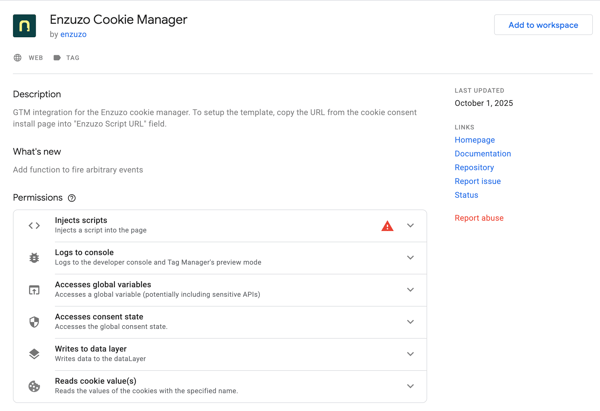
In GTM, go to Templates and search the Community Gallery for the Enzuzo Cookie Manager template. Add it to your workspace. Create a new tag using this template, paste in your Enzuzo script URL, and set the trigger to Consent Initialization, not Page View. Consent Initialization fires before any other tag in the container. This ensures Enzuzo sets the consent state before any marketing tag has the opportunity to execute.
Step 4: Gate Meta Pixel (and all other marketing tags) correctly
Open your Meta Pixel tag in GTM. Add two triggers:
- All Pages: for returning visitors who already consented in a previous session
- Custom Event: enzuzo_consent_update — for new visitors who consent after the page has loaded
Also, enable GTM's built-in consent check on the tag: go to Advanced Settings, select Consent Settings, and require ad_storage consent before the tag fires. This adds a second layer: even if the trigger fires, GTM will not execute the tag unless the consent signal confirms the user has accepted.
Apply the same pattern to TikTok Pixel, LinkedIn Insight Tag, and every other advertising tag in your container. Google's Consent Mode documentation explains in detail how consent state interacts with tag firing behaviour.
Step 5: Handle single-page applications (SPAs)
If your website is built on React, Vue, or Next.js, route changes do not reload the page, which means the consent check may not re-run after navigation. You need to ensure that the Enzuzo banner re-evaluates consent state on each route change. This is a common gap in SPA implementations and is frequently cited in demand letters against SaaS products.
Step 6: Test before publishing
Use GTM's Preview Mode to verify the full implementation:
- Open your site in incognito via GTM Preview Mode — confirm no pixel network requests fire before you interact with the consent banner
- Click Accept All — confirm Meta Pixel fires immediately
- Reload the page — confirm Meta Pixel fires on load (returning visitor)
- Open a second incognito window, click Reject All — confirm Meta Pixel does not fire at any point
Publish your GTM container once all scenarios pass.
How CIPA demand letter cases typically play out
Understanding the likely trajectory helps you make better decisions about how to respond.
Early settlement
The most common outcome. The defendant engages counsel, responds within the deadline, and negotiates a settlement. Amounts are typically lower than the initial demand. The advantage is certainty and speed. The risk is that settling without remediating the implementation signals to other plaintiff firms that you are a settlement target.
Successful defence or dismissal
Some cases are challenged and dismissed due to lack of standing, insufficient evidence of real-time interception, or a successful consent defence. The April 2025 ruling in Torres v. Prudential Financial narrowed Section 631 liability for session replay tools that process data post-transmission. Businesses with clean consent logs and compliant GTM implementations are better positioned to defend.
Extended litigation
A smaller subset of cases proceeds through discovery and motion practice. Legal fees can exceed the original settlement demand regardless of outcome. This path is typically chosen when the claim appears weak on the merits and the business wants to avoid setting a precedent for future demands.
Class action escalation
In some cases, an individual demand letter is a precursor to a class action. High California traffic and no consent logging are the highest-risk profile for this outcome. Each user session where the pixel fired without consent is a separate potential violation, and the damages math changes dramatically at scale.
Get compliant before the next demand letter arrives.
Enzuzo blocks all non-essential tracking scripts until a user consents and logs every consent event as timestamped legal documentation.
Book a call with a CIPA expert
Frequently asked questions
What is a CIPA demand letter?
A CIPA demand letter is a formal notice from a private plaintiff law firm asserting that your website violated California's Invasion of Privacy Act by running tracking tools without prior user consent. It cites the specific technology observed, the statute violated, and a settlement demand with a response deadline. It is not a lawsuit, but it typically leads to one if ignored.
Can I ignore a CIPA demand letter?
No. Ignoring a demand letter typically results in the firm filing a formal complaint within weeks of the missed deadline. Once filed, your settlement leverage drops and your legal costs rise. Even if you believe the claim lacks merit, respond through counsel rather than ignoring it.
How much does a CIPA settlement cost?
Based on Enzuzo's review of demand letters shared by affected customers, settlements have ranged from $10,000 to $200,000 per claim. The amount depends on the number of tracking tools cited, the volume of California visitor traffic, and how the defendant negotiates. Most cases settle below the initial demand.
Does a cookie banner protect me from a CIPA claim?
Only if it technically gates all tracking scripts before they fire. A banner that displays a consent dialog while scripts run in the background, or that continues firing after the user declines, is not a defence. The banner must actually block non-essential scripts until affirmative consent is given.
Which tracking tools most commonly trigger CIPA demand letters?
Meta Pixel is the most frequently named tool. TikTok Pixel, session replay software (Hotjar, FullStory, Microsoft Clarity), and live chat widgets (Intercom, Drift, HubSpot Chat) are also commonly cited. Any tool that fires on page load and transmits user interaction data to a third-party server before consent creates potential Section 631 exposure.
Will settling a CIPA demand letter stop further claims?
Not if you do not remediate the underlying implementation. Other plaintiff firms monitor settlement patterns. A business that settles without fixing its consent setup can receive additional letters. Technical remediation is the only durable protection.
What is the difference between CIPA and CCPA?
CCPA is a data privacy law using an opt-out consent model, enforced by the California Privacy Protection Agency. CIPA is a wiretapping statute enforced by private plaintiffs, requires prior opt-in consent before tracking begins, and carries $5,000 per-violation damages without proof of harm. A CCPA-compliant site can still violate CIPA. See our full CIPA compliance guide for the full comparison.
Which types of companies receive CIPA demand letters?
Any consumer-facing website with California traffic running non-compliant tracking tools. Media publishers, ecommerce brands, healthcare platforms, and SaaS companies with marketing-heavy tech stacks are the most common targets.
Osman Husain
Osman is the content lead at Enzuzo. He has a background in data privacy management via a two-year role at ExpressVPN and extensive freelance work with cybersecurity and blockchain companies. Osman also holds an MBA from the Toronto Metropolitan University.
LinkedIn →More related blogs
Your next read


-M-1.jpg)